Connecting to AWS
We have made the connection process as low touch as possible. We also provide several options that allow you to tailor the connection to your needs. See the available options by clicking the create button in the organisation you want to add the connection to on the connections screen.
On the creation screen you will see the following options.
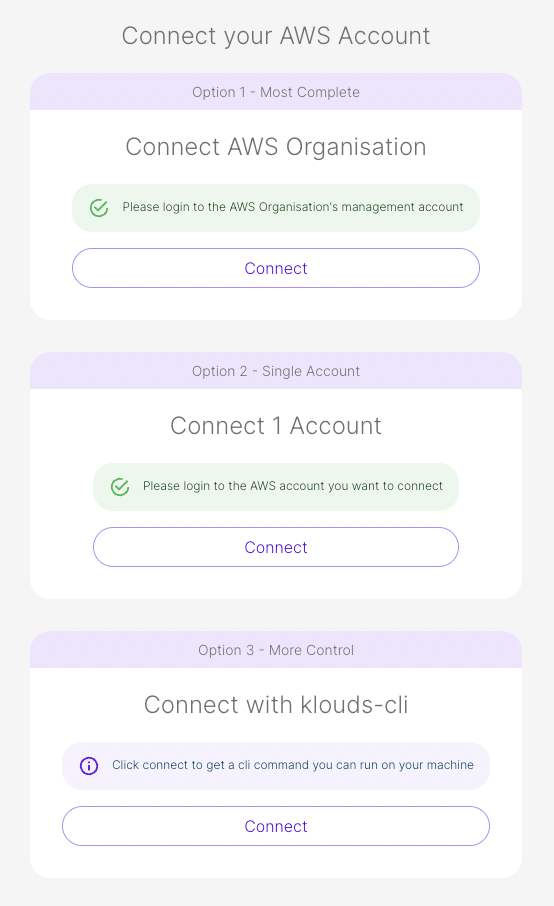
Option 1 - Connect AWS Organisation
This is the most complete option. It will allow you to connect your master account and will automatically connect all of its child accounts. We do this by first creating a CloudFormation Stack in your master account. This subsequently creates a Stack Set which will target any children accounts. Other CloudFormation Stacks will be run in the children accounts.
You will be asked to input a list of Organisational Unit Ids or a Root Id. These can be found for your account by clicking here.
More information on AWS Organisations can be found here.
Here are the list of items that will be created using this option.
In the Master Account
- A Cost and Usage Report (More Information here)
- An S3 Bucket to store the reports
- An IAM Role with cross-account permissions so we can connect securely to this account (See here for list of permissions)
In the Children Accounts
- An IAM Role with cross-account permissions so we can connect securely to this account (See here for list of permissions)
Option 2 - Connect 1 Account
If you only want to try this out in a single account then this simplified version of option 1 is for you. This will create a CloudFormation template that generates the following resources.
- A Cost and Usage Report (More Information here)
- An S3 Bucket to store the reports
- An IAM Role with cross-account permissions so we can connect securely to this account (See here for list of permissions)
Option 3 - The Command Line Interface (klouds-cli)
This is the most flexible option giving you more choices. If you already have cost and usage reports, this option will allow you to provide them instead of generating new ones. It will also give you the option of generating them through the CLI.
The CLI will only allow you to select existing reports if they match our criteria (GZIP format, Daily cadence, Including Resource Ids).
If you don't want to run CloudFormation, you can also opt to have the CLI generate the resources for you. This option is currently only available to a single account connection.